




Tech Trends & Innovation: The Latest in Tech News
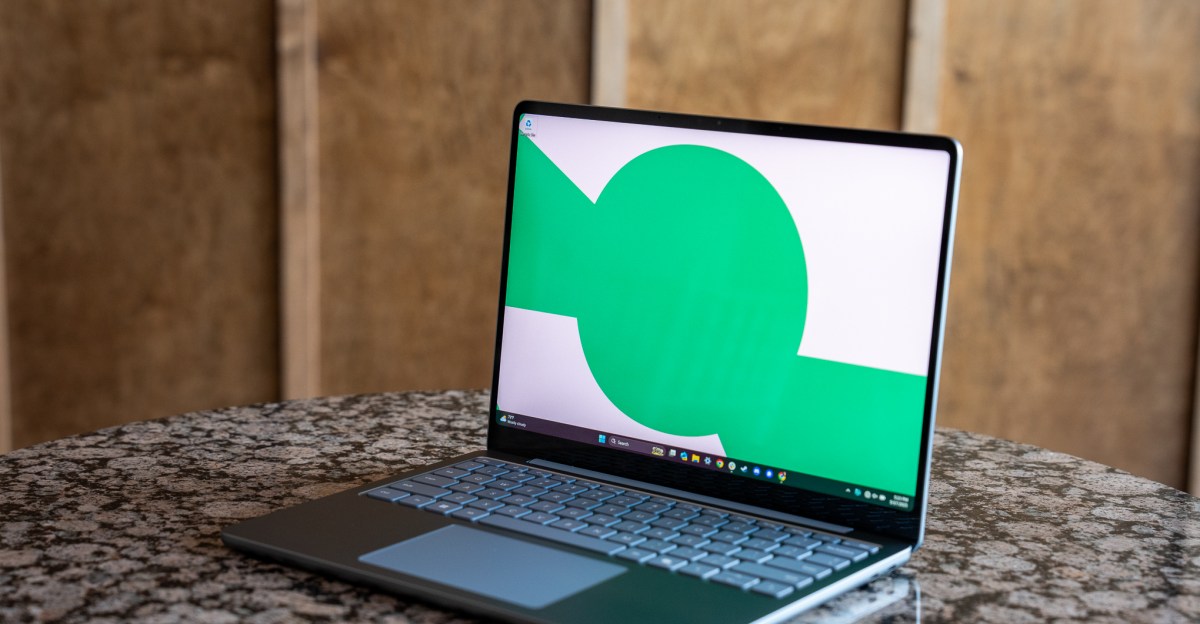
- Exquisite hardware: the Surface Laptop 13-inch has a very good keyboard and a satisfying mechanical trackpad.
- Excellent battery life; can stretch to 1.5 days with native Windows on Arm apps and exceptional standby times.
- Cost-cutting downgrades: lower-res 1920x1280 60Hz screen, two fewer CPU cores, no biometric face unlock, and no magnetic Surface Connect.
- App and game compatibility on Windows on Arm improved but still spotty; major Adobe apps and anti-cheat games may not run.
- Outstanding value around $900: stylish build and strong productivity performance, yet less capable than alternatives for heavy content creation.
Microsoft finally found its answer to the MacBook Air last year with the 13.8-inch Surface Laptop (formerly known as 7th Edition). That Snapdragon X-powered laptop matched the MacBook in build quality, battery life, and at least some aspects of performance — something Windows laptop makers have been trying to do for ages. The 13.8-inch Surface Laptop was brilliant, but Windows on Arm’s occasional app incompatibility stopped it just shy of being the default alternative to the MacBook Air.
Nearly a year later, Microsoft has new Snapdragon-based Surfaces that are a little smaller and a little cheaper. The $899.99 13-inch Surface Laptop is nearly as great as last year’s, despite some cost-cutting measures like a lower-resolution screen, a processor with two fewer cores, no face unlock, and no magnetic charging port. The hardware remains excellent, and Windows on Arm is even slightly better than last year. It’ll probably work fine for some of you, but not all.

$900
The Good
- Exquisite hardware that feels great to touch and use
- Very good keyboard and one of the best mechanical trackpads
- Battery can stretch to 1.5 days (with native Arm apps)
- 3:2 aspect ratio screen is ideal for productivity
The Bad
- Webcam doesn’t support Windows Hello
- Loss of magnetic charging port
- Snapdragon X still has app and game compatibility issues that competing chips do not
- Why have Home, Page Up, and Page Down keys instead of media controls?
The base 13-inch Surface Laptop, officially known as the Microsoft Surface 13-inch 1st Edition with Snapdragon (man alive, what a name), has an 8-core Qualcomm Snapdragon X Plus processor, 16GB of RAM, and 256GB of storage. For an additional $100, you can get 512GB of storage. If you want more RAM or storage — or a more powerful processor — you’ll need to jump to last year’s 13.8-inch model, which now starts at $1,099.99 with a 10-core processor and 512GB SSD.
- Screen: B
- Webcam: B
- Mic: C
- Keyboard: B
- Touchpad: B
- Port selection: C
- Speakers: C
- Number of ugly stickers to remove: 0
There isn’t a single major flaw in the new Surface Laptop’s hardware, though there are some minor downgrades and unfortunate omissions compared to the larger version. It doesn’t quite match the 13.8-inch’s screen, trackpad, ports, or webcam, but it’s a very good offering for its lower price. The 13-inch Surface has a 400-nit IPS screen that’s 1920 x 1280 resolution and 60Hz. It’s sharp and pleasing to look at, and it retains the 3:2 aspect ratio that’s so great for productivity, but it’s a step down from the 2304 x 1536 and 120Hz of the 13.8-inch Surface.
For ports, it’s equipped with a pair of USB-C 3.2, one USB-A 3.1, and a 3.5mm combo audio jack. It lacks the magnetic Surface Connect port of the larger models, which means you’re reliant on USB-C for power and port expansion. I can forgive that, but the more disappointing omission is Windows Hello face unlock. The 1080p webcam is otherwise sharp and contrasty, but Microsoft opted for Windows Hello biometric unlocking through a fingerprint sensor in the power button instead, likely to save money.
But, thankfully, there are a few key areas where the 13-inch excels despite its cost-cutting measures. The four-speaker setup sounds pretty good overall, though once you crank the volume, the low end hollows out. Typing on the Surface is pretty quiet and has just enough tactile feedback to feel nice — I even prefer it to the MacBook Air that it’s competing with. But one of my favorite parts is the trackpad. It’s mechanical, instead of haptic like its larger counterparts, but I’ve been shocked by how good it sounds and feels. Each click is crisp and well defined; it has a nice ka-chunk that’s pretty satisfying. You can’t click anywhere on it like you can on a haptic pad, but if every mechanical trackpad were this good, I’d finally shut up about it.


1/2
Like last year’s 13.8-inch Surface Laptop, the Qualcomm chip sips power and can even get through a 12-hour day of productivity apps (messaging, calls, Google Docs, lots of Chrome tabs, occasional music listening, downloading and uploading files). It also has exceptional standby times, so you can leave it closed and unplugged overnight with minimal battery drain.
Even if your laptop stays plugged in most days, it’s just so convenient not to worry about battery life when you take it off the charger. As I type this, it’s around 5:30PM, and I unplugged the charger at 10AM. I’ve had a one-hour Zoom video call — always a battery killer — and mixed use between productivity apps and some photo editing in Lightroom Classic (which isn’t a native Arm app, so it drains the battery faster). The Surface dipped below 30 percent battery and Windows turned on energy saver mode well over an hour ago, and I haven’t had to rush from my spot to plug in.


The 8-core Snapdragon X Plus processor performs well for core productivity and work tasks, though it did slow down once for me during some heavy multitasking on battery power. That was so far a one-off. I was on a browser-based Microsoft Teams video call, bouncing in and out of a document to take notes, with over 15 Chrome tabs open and a couple of other apps like Slack and Signal running in the background. It didn’t crash, but things slowed down for a moment while the video feed on Teams crapped out. I was able to jumpstart the video again by minimizing the window and restoring it, and things went back to normal.
The fan kicks on when you’re working it hard like that, but it almost always stays quiet and inoffensive. It would have been nice to see Microsoft go fanless as it did on the new 12-inch Surface Pro. Fortunately, any fan noise is infrequent enough that I often forget it’s there, and the chassis never got more than slightly warm to the touch.
With two fewer cores than the 13.8-inch and four fewer than its pricier Snapdragon X Elite configurations, the 13-inch is predictably slower at multicore tasks and related synthetic benchmarks. It’s still adequate for general purpose needs, but it’s not going to do any heavy lifting in creative apps without slowing down. By contrast, an M4 MacBook Air costing just $100 more than the Surface Laptop 13-inch can dabble in content creation apps and actually beats all the Surfaces (even the pricier ones) in many of our tests. It’s still hard to beat Apple, but if you’re not cross-shopping operating systems that doesn’t really matter.
System |
Microsoft Surface Laptop 13-inch / Snapdragon X Plus 8C / 16GB / 512GB |
Microsoft Surface Laptop 13.8-inch / Snapdragon X Plus 10C / 16GB / 512GB |
Microsoft Surface Laptop 15-inch / Snapdragon X Elite 12C / 16GB / 512GB |
MacBook Air 13-inch M4 / 10C / 10C / 16GB / 512GB |
|---|---|---|---|---|
| Geekbench 6 CPU Single | 2437 | 2446 | 2841 | 3775 |
| Geekbench 6 CPU Multi | 11427 | 13190 | 14661 | 14899 |
| Geekbench 6 GPU (OpenCL) | 9391 | 19993 | Not tested | 30701 |
| Cinebench 2024 Single | 109 | 108 | 122 | 171 |
| Cinebench 2024 Multi | 682 | 808 | 971 | 736 |
| PugetBench for Photoshop | 4773 | 5600 | 6748 | 10163 |
| Sustained SSD reads (MB/s) | 3840.78 | 3663.1 | 3656 | 2910.04 |
| Sustained SSD writes (MB/s) | 3476.62 | 2478.44 | 2944 | 2115.57 |
| Blender Classroom test (seconds, lower is better) | 486 | 418 | 712 (tested before Blender had Arm support) | 69 |
While app compatibility can also be a mixed bag, I’m relieved that it’s gotten better since last year. The vast majority of Windows apps work fine on Arm, either natively or through emulation, but there are enough edge cases, especially around photo and video editing, 3D rendering, and music creation, that you still do need to make sure your apps are going to work well before you buy.
In my review of the HP OmniBook X, I lamented that the lack of support for Adobe Lightroom Classic forced me to use the standard, mobile-centric Lightroom, which I hate. Lightroom Classic now works via emulation, and it does so quite well. I can edit my 50-megapixel RAW files on the Surface Laptop 13-inch, and it’s fast enough for some dip in, dip out sessions. I wouldn’t want to edit an elaborate product shoot on a tight deadline or cull and batch-process a full wedding shoot, but it’s good to know that I can do some photo editing if I have to.
It’s still hard to beat Apple, but if you’re not cross-shopping operating systems that doesn’t really matter.
But elsewhere, even within the Adobe Creative Cloud suite, there are still some major omissions. Adobe After Effects, Illustrator, and InDesign have zero support for Windows on Arm — they don’t even run emulated. Adobe says on its help page that Arm-supported versions of these apps “will be released soon,” but there’s no estimated timeframe.
In other cases, apps run but still leave a bit to be desired. Blender was updated with Windows on Arm support last year, but it still doesn’t fully utilize the Snapdragon X’s GPU cores, leading to significantly longer rendering times than even a MacBook Air. Windows on Arm seems to be on the right trajectory, but it’s going to take much longer to reach full parity with vanilla x86 Windows, especially if you account for games.
1/7
Game support for the Snapdragon-based Surfaces, as with Macs, is still a crapshoot. The Surface Laptop 13-inch is not a gaming machine, obviously, but plenty of games that work just fine on other Windows laptops with integrated graphics run poorly or not at all. Right now, most popular online shooters, like Fortnite and Valorant, which include anti-cheat software, can’t run on Windows on Arm laptops (though Fortnite is coming to Arm eventually). Some of my favorite indies — like Vampire Survivors and Balatro — work, but your best option is to stream games from services like GeForce Now or Xbox Cloud Gaming, though even as a PC Game Pass subscriber, you can’t install any Game Pass games locally like you can on x86 PCs.
There’s an easier path around these obstacles. Microsoft could have just used an Intel Lunar Lake chip in the new Surface Laptop, which would have likely sacrificed some battery efficiency for wide-ranging app and game compatibility. Last year’s Surfaces did get that as an option, but Microsoft positioned them as enterprise laptops with higher prices. You can buy them, but only at specialized retailers.

Despite Microsoft’s ongoing Windows on Arm push, the vast majority of the Windows ecosystem and user base still lives on x86. Since the first Snapdragon X PCs came out last year, Intel Lunar Lake and AMD Strix Point chips have proven x86 still has the juice (for now), and there’s a draw to sticking with a proven platform instead of risking potential frustrations with Arm, especially for creative work.
Opting for a Lunar Lake laptop like the Lenovo Yoga Slim 7i , or a Strix Point one like Asus’s Zenbook S 16, avoids the app compatibility issue entirely and gets you better performance in graphical tasks like photo and video editing, at the cost of a few hours of battery life and a few hundred dollars. Though, there are pricier Windows laptops running these chips that totally flub the basics compared to the Surface.

At $900, the 13-inch is an exceptional no-nonsense Windows laptop for general productivity stuff, and it looks and feels great. It’s right at the price range where laptops start getting really good, without the kinds of compromises that feel like penalty boxes a few years later: slow processors, low-quality screens, bad battery life, or cheap builds. It’s much better hardware than some other laptops in its price range, with better battery life, in exchange for small compromises on speed and app compatibility. The 13.8-inch version is still nicer overall, but that one now costs $200 to $300 more thanks to Microsoft’s own price and configuration shuffling.
Would I buy one for myself? Truthfully, no. I moonlight as a wedding photographer, and while Lightroom Classic works with Windows on Arm now, it’s just not fast enough to rely on yet. And my gaming sensibilities lead me to feeling that if I can’t play games on a laptop, I might as well switch back to a MacBook.
But nearly every downside of the Surface Laptop 13-inch is just a downside of Windows on Arm. If developers keep updating their programs to use the architecture properly, the edge cases get fewer, and the closer the Surface Laptop 13-inch gets to being the easy answer to “what laptop should I buy?”
2025 Microsoft Surface Laptop 13-inch specs (as reviewed)
- Display: 13-inch (1920 x 1280) 60Hz touschscreen
- CPU: Qualcomm Snapdragon X Plus X1P-42-100
- RAM: 16GB LPDDR5X (non-replaceable)
- Storage: 512GB UFS
- Webcam: 1080p
- Connectivity: Wi-Fi 7, Bluetooth 5.4
- Ports: 1x USB-A 3.1, 2x USB-C 3.2, 3.5mm combo audio jack
- Weight: 2.7 pounds
- Dimensions: 11.25 x 8.43 x 0.61
- Battery: 50Wh
- Price: $999.99
Photography by Antonio G. Di Benedetto / The Verge
Read the full article from the original source
