


Close Menu
Savannah HeraldSavannah Herald
    • Home
    • News
      • Local
      • State
      • National
      • World
      • HBCUs
    • Events
    • Directories
    • Weather
    • Traffic
    • Jobs
    • Sports
    • Politics
    • Lifestyle
      • Faith
      • Senior Living
      • Health
      • Travel
      • Beauty
      • Fashion
      • Food
      • Art & Literature
    • Business
      • Real Estate
      • Entertainment
      • Investing
      • Education
    • Guides
      • Summer Camp Guide
      • Juneteenth Guide
      • Black History Savannah
      • MLK Guide Savannah
    We're Social
    • Twitter
    • Facebook
    • YouTube

    Subscribe to Updates

    Get the latest creative news from FooBar about art, design and business.

    Trending
    • Georgia Trend Daily – July 13, 2026
    • No charges for Atlanta officer in off-duty shooting
    • United Airlines Must Face Lawsuit Over Window Seats Without Windows
    • Bipartisan 21st Century ROAD to Housing Act, Including Congressman Al Green’s Reforming Disaster Recovery Act
    • Free HIV Testing Event July 21 in Savannah for Zero HIV Stigma Day
    • I made driving with Google Maps less frustrating by changing these 3 settings
    • SC Gullah artists turn trash into treasure for art project
    • Georgia Trend Daily – July 9, 2026
    Facebook X (Twitter) Instagram YouTube
    Login
    Savannah HeraldSavannah Herald
    Savannah HeraldSavannah Herald
    Home » I made driving with Google Maps less frustrating by changing these 3 settings

    I made driving with Google Maps less frustrating by changing these 3 settings

    Savannah HeraldBy Savannah HeraldJuly 13, 20266 Mins Read
    Facebook Twitter Pinterest LinkedIn WhatsApp Reddit Tumblr Email
    I made driving with Google Maps less frustrating by changing these 3 settings
    Share
    Facebook Twitter LinkedIn Pinterest Email

    Science & Discovery: Discover the World Through Research and Innovation

    Key takeaways
    • Turn off automatic dark/light Theme in Google Maps and pick a static map style to avoid distracting theme switches while driving.
    • Set navigation color scheme to Day or Evening in Google Maps and in Android Auto to prevent sudden style changes.
    • Mute voice directions or choose Alerts only in Google Maps to cut redundant spoken prompts while using on-screen navigation.
    • Tell Google Maps your vehicle type and charging method for more accurate fuel-efficient routing and EV planning.
    • If still frustrated, try driving-focused alternatives like Waze for more driver-centric features.

    Google Maps is possibly one of the most vital Android app a lot of us utilize in our cars. Whether it’s a long trip, seeing a city you’ve never been to, or simply locating a tiny regional store you’ve never become aware of, it’s hard to also picture driving without Google Maps.

    Nonetheless, as useful as the application is, there are a couple of typical annoyances caused by the way it’s set up out of the box. If your major objective is to support the wheel and start driving towards your location, right here are a few settings that can make your Google Maps experience much better.

    Turn off the automatic dark and light theme

    Maintain the map experience constant

    I are among the biggest supporters of dark setting throughout all tools and apps. Nevertheless, Google Maps is among those places where I have actually expanded so accustomed to the light version that it’s come to be practically difficult for me to navigate a location in dark setting.

    I’ve attempted making use of the automatic configuration several times throughout the years, and I quit whenever. The last thing I wish to do while trying to concentrate on the roadway is determine where I’m supposed to be headed by staring at a dark map for a little also long.

    Now, this isn’t to claim that you shouldn’t make use of dark setting in Google Maps– if that’s what you like, go all out.

    The real trouble is the automated mode , which dynamically moves the style of Maps based upon your tool motif. It’s particularly aggravating around sunset and dawn or when going into tunnels since the style can alter at troublesome times, requiring you to get used to a different map look while driving.

    Establishing a static theme in Google Maps is remarkably complex because there are 2 different options you’ll require to set up.

    To set a difficult shade theme in Google Maps, tap your profile icon > Settings > Application & & Present > Motif Select Always in light motif or Constantly in dark motif , and Conserve

    Now comes the actually important part for driving– you may observe that the style still changes when you start browsing to your destination. To transform the navigation-specific style, head over to Settings > Navigating Scroll right to Map screen Under Color scheme , alter the motif to Day or Evening , then close the food selection.

    We’re refrained right now, though.

    If you make use of Google Maps with Android Auto , there’s one more, extra basic Day/Night mode choice for maps that you might require to set up in Android Car in addition to the Google Maps app. Android Car can regulate exactly how compatible apps show up on your automobile’s display, indicating it can bypass the style habits you set on your phone.

    To find it, head over to Settings on your phone. In the search bar, kind “Android Vehicle,” after that tap on the choice. Scroll to Day/Night setting for maps and select your preferred mode.

    Restriction talked directions if you’re already considering the map

    Cut the noise without losing navigation

    I recognize this isn’t the instance for everyone, however I have actually always found voice assistance while driving somewhat repetitive if I’ve already obtained the map pulled up on my control panel. I can drive simply fine with either audio navigating or aesthetic navigation, however having both at the exact same time feels overwhelming, particularly when attempting to concentrate on browsing limited roadways in a jam-packed city.

    Besides, the on-screen instructions and distance prior to the following turn are truthfully in some cases less confusing than voice guidance

    Thankfully, Google provides you an easy method to alter this in actual time after beginning navigation. Simply tap the speaker symbol and mute voice advice or, even better, set it to alerts by touching the speaker symbol with the! symbol to remain alerted of important updates.

    An additional way to set up voice guidance is to tap your account icon > Settings > Navigation Under Audio & & voice , alter the Mute state to either Soft or Signals just

    Inform Google Maps what you’re driving

    A tiny adjustment that can make navigating really feel even more immersive

    Google Maps has a fuel-efficient directing feature that’s enabled by default. However, it can not do an excellent task approximating how much energy you’re using because it doesn’t in fact recognize what sort of lorry you’re driving up until you transform it in the setups.

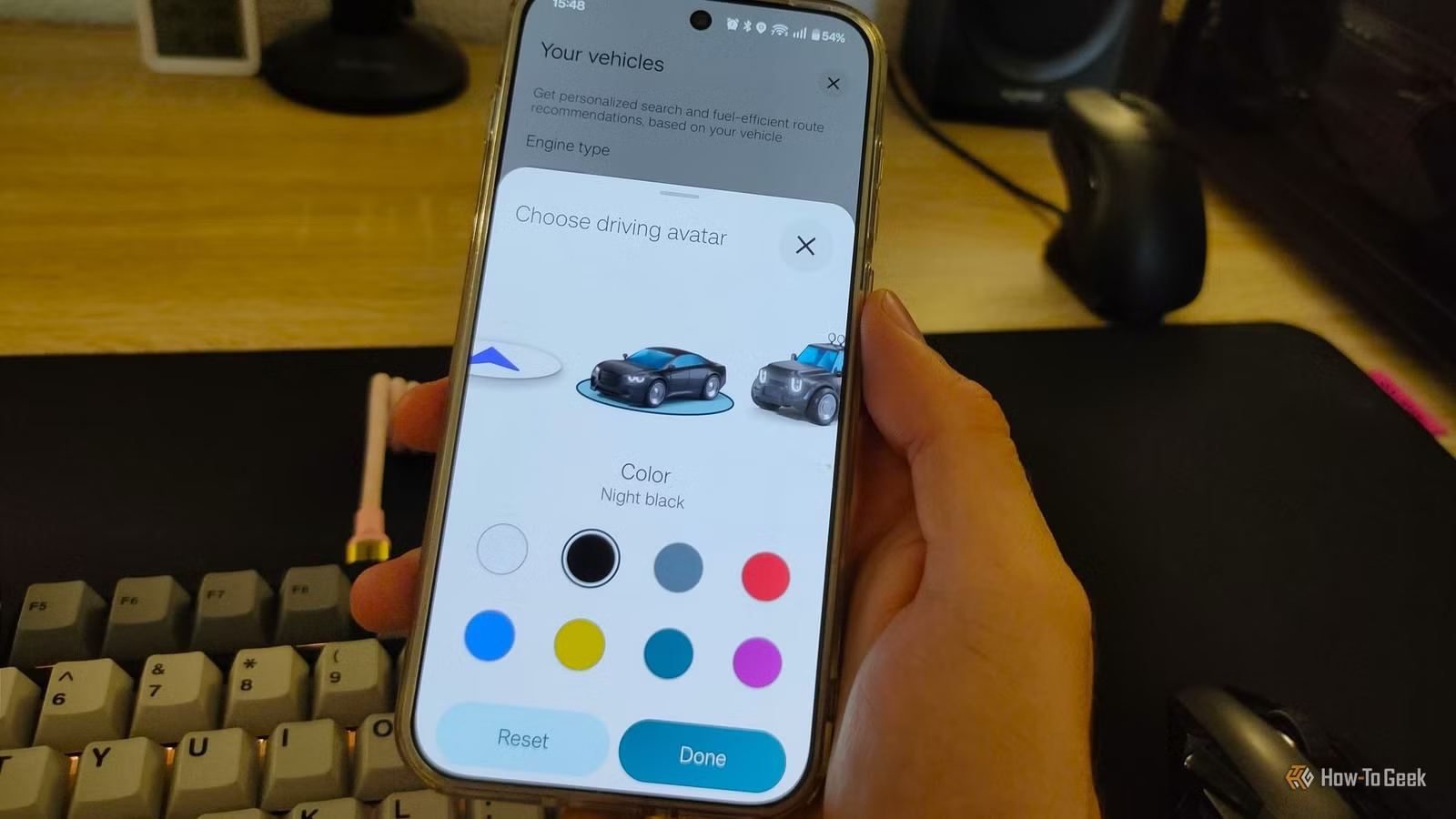
    Luckily, there’s a very easy way to take care of that– and slightly customize the look of Google Maps while you go to it. To find it, tap your account icon > Setups > Your lorries From here, pick the proper engine type for your automobile (and do not fail to remember to establish the billing kind for plug-in hybrids and EVs).

    To establish a custom-made driving character to change the monotonous blue arrow, touch the Automobile choice, select your preferred character and car color, then touch Done I didn’t find that it assisted me navigate cities any better, but at the very least, it’s an eccentric little reminder that I’m driving a black sedan.


    There are various other maps apps around

    Although you can take your driving experience from suitable to excellent by configuring the app, Google Maps is ultimately the Pocket knife of maps apps, not a dedicated driving app. If you want a more concentrated driving experience, there are choices constructed around driving from the ground up.

    The very first one that comes to mind is Waze , which shares a number of Google Maps’ staminas because it’s likewise owned by Google, but puts a much bigger emphasis on drivers. So, if you’re still irritated by Google Maps, it could be worth giving one more app a shot.

    A phone with the Waze icon overlapping the Google Maps icon.

    I have actually made use of Waze for 10 years– right here’s why I decline to switch to Google Maps

    Google owns both, yet Waze is better.

    Read the complete short article from the initial resource

    Related Posts

    • Tariffs, Technology, and the New Geography of Manufacturing
    • SAVE Student Loan Borrowers, Interest Restarts on Friday. Should You Move to IBR Now?
    • Most of the government could shut down this weekend. ICE operations would carry on.
    • Forget The Amazon: ‘Anaconda’ (2025) Was Actually Filmed In This Australian Paradise
    • Cruz Azul vs. Vancouver Whitecaps 2025 livestream: Watch Concacaf Champions Cup for free
    • Protecting Elderly Self-reliance Begins in the house
    • GenLayer launches a new method to incentivize people to market your brand using AI and blockchain
    • Georgia Ports Authority encourages neighborhood to be “Climate Prepared” forward of Hurricane Season
    Breakthrough Discoveries climate change Earth and Planetary Science Environmental Policy Environmental Updates Global Warming Health & Science medical research NASA Updates Nature & Wildlife Renewable Energy Science and Innovation Science in the News Science news Scientific Community Scientific Research Space Exploration STEM Education Sustainable Future Technology and Science
    Share. Facebook Twitter Pinterest LinkedIn WhatsApp Reddit Tumblr Email
    Savannah Herald
    • Website

    Related Posts

    Health July 13, 2026

    What Is an Aortic Dissection?

    July 12, 2026

    Typhoon Bavi: China evacuates nearly two million people as powerful typhoon makes landfall

    Health July 12, 2026

    The World Remembers Sen. Lindsey Graham

    July 11, 2026

    What China’s Successful Rocket Launch Means for the Future of the Space Race

    Health July 11, 2026

    EPA promised a Make America Healthy Again agenda. It has yet to materialize, frustrating activists

    Health July 10, 2026

    How Evil Dead Burn Fits Into the Long-Running Horror Franchise

    Comments are closed.

    Don't Miss
    Business June 29, 2026By Savannah Herald07 Mins Read

    Spies, Sanctions, Cyberattacks: China and the U.S. Clash Behind the Scenes

    June 29, 2026

    Business Insights: Global Markets, Strategy & Economic Trends The word from the White House went…

    HBCU track celebrity makes it through being flung by twister

    August 28, 2025

    A Personal Journey through America’s 100 Greatest Golf Courses” Now Available in Paperback by former Collegiate Athlete Jimmy James – African American Golfer’s Digest

    August 28, 2025

    Former U.S. Vice President Dick Cheney Dies at 84

    November 11, 2025

    Portal boys' Macon bound after semifinal triumph

    March 6, 2026
    Archives
    • July 2026
    • June 2026
    • May 2026
    • April 2026
    • March 2026
    • February 2026
    • January 2026
    • December 2025
    • November 2025
    • October 2025
    • September 2025
    • August 2025
    • July 2025
    • June 2025
    • May 2025
    • April 2025
    • March 2025
    • February 2025
    Categories
    • Art & Literature
    • Beauty
    • Black History
    • Business
    • Climate
    • Culture
    • Education
    • Employment
    • Entertainment
    • Faith
    • Fashion
    • Food
    • Gaming
    • Georgia Politics
    • HBCUs
    • Health
    • Health Inspections
    • Investing
    • Lifestyle
    • Local
    • Lowcountry News
    • National
    • National Opinion
    • News
    • Politics
    • Real Estate
    • Senior Living
    • Sports
    • State
    • Tech
    • Traffic
    • Transportation
    • Travel
    • World
    Savannah Herald Newsletter

    Subscribe to Updates

    A round up interesting pic’s, post and articles in the C-Port and around the world.

    About Us
    About Us

    The Savannah Herald is your trusted source for the pulse of Coastal Georgia and the Low County of South Carolina. We're committed to delivering timely news that resonates with the African American community.

    From local politics to business developments, we're here to keep you informed and engaged. Our mission is to amplify the voices and stories that matter, shining a light on our collective experiences and achievements.
    We cover:
    🏛️ Politics
    💼 Business
    🎭 Entertainment
    🏀 Sports
    🩺 Health
    💻 Technology
    Savannah Herald: Savannah's Black Voice 💪🏾

    Our Picks

    The Source |Tupac’s ‘All Eyez On Me’ And Eric B. & Rakim’s ‘Paid In Full’ Have Been Inducted Into The Grammy Hall Of Fame

    May 11, 2026

    Gulfstream’s Skyward event draws global business aviation leaders to Savannah

    April 14, 2026

    Boxed cake mix isn’t a cheat. It’s a gift

    June 14, 2026

    Air Fryer Duck – Reduced Carbohydrate Africa

    June 29, 2026

    Mathematicians stunned by AI’s biggest breakthrough in mathematics yet

    May 21, 2026
    Categories
    • Art & Literature
    • Beauty
    • Black History
    • Business
    • Climate
    • Culture
    • Education
    • Employment
    • Entertainment
    • Faith
    • Fashion
    • Food
    • Gaming
    • Georgia Politics
    • HBCUs
    • Health
    • Health Inspections
    • Investing
    • Lifestyle
    • Local
    • Lowcountry News
    • National
    • National Opinion
    • News
    • Politics
    • Real Estate
    • Senior Living
    • Sports
    • State
    • Tech
    • Traffic
    • Transportation
    • Travel
    • World
    Copyright © 2002-2026 Savannahherald.com All Rights Reserved. A Veteran-Owned Business

    Type above and press Enter to search. Press Esc to cancel.

    Manage Consent
    To provide the best experiences, we use technologies like cookies to store and/or access device information. Consenting to these technologies will allow us to process data such as browsing behavior or unique IDs on this site. Not consenting or withdrawing consent, may adversely affect certain features and functions.
    Functional Always active
    The technical storage or access is strictly necessary for the legitimate purpose of enabling the use of a specific service explicitly requested by the subscriber or user, or for the sole purpose of carrying out the transmission of a communication over an electronic communications network.
    Preferences
    The technical storage or access is necessary for the legitimate purpose of storing preferences that are not requested by the subscriber or user.
    Statistics
    The technical storage or access that is used exclusively for statistical purposes. The technical storage or access that is used exclusively for anonymous statistical purposes. Without a subpoena, voluntary compliance on the part of your Internet Service Provider, or additional records from a third party, information stored or retrieved for this purpose alone cannot usually be used to identify you.
    Marketing
    The technical storage or access is required to create user profiles to send advertising, or to track the user on a website or across several websites for similar marketing purposes.
    • Manage options
    • Manage services
    • Manage {vendor_count} vendors
    • Read more about these purposes
    View preferences
    • {title}
    • {title}
    • {title}
    Ad Blocker Enabled!
    Ad Blocker Enabled!
    Our website is made possible by displaying online advertisements to our visitors. Please support us by disabling your Ad Blocker.

    Sign In or Register

    Welcome Back!

    Login below or Register Now.

    Lost password?

    Register Now!

    Already registered? Login.

    A password will be e-mailed to you.