


Close Menu
Savannah HeraldSavannah Herald
    • Home
    • News
      • Local
      • State
      • National
      • World
      • HBCUs
    • Events
    • Directories
    • Weather
    • Traffic
    • Jobs
    • Sports
    • Politics
    • Lifestyle
      • Faith
      • Senior Living
      • Health
      • Travel
      • Beauty
      • Fashion
      • Food
      • Art & Literature
    • Business
      • Real Estate
      • Entertainment
      • Investing
      • Education
    • Guides
      • Summer Camp Guide
      • Juneteenth Guide
      • Black History Savannah
      • MLK Guide Savannah
    We're Social
    • Twitter
    • Facebook
    • YouTube

    Subscribe to Updates

    Get the latest creative news from FooBar about art, design and business.

    Trending
    • HBCU could benefit from local high school campus donation
    • Naomi Osaka Gets Candid About Motherhood, Pressure, and Learning to Ask for Help
    • Intel CPUs with Nvidia RTX integrated graphics are targeting an early 2028 release
    • Michael Jackson Legacy Threatened Again With New Lawsuit
    • Georgia gas tax ends, prices remain high
    • Jerk Soul Founder Moves To Ghana, Starts Over
    • Is RecentFollow Ethical to Use? A Guide to Public Instagram Data and Boundaries
    • Cuba quantifies impact of US oil blockade on children’s health and daily life
    Facebook X (Twitter) Instagram YouTube
    Login
    Savannah HeraldSavannah Herald
    Savannah HeraldSavannah Herald
    Home » Epson QS100 4K PRO-UHD 3LCD Laser Projector Review: An Exceptional Home-Theater Centerpiece
    Tech

    Epson QS100 4K PRO-UHD 3LCD Laser Projector Review: An Exceptional Home-Theater Centerpiece

    Savannah HeraldBy Savannah HeraldSeptember 3, 20255 Mins Read
    Facebook Twitter Pinterest LinkedIn WhatsApp Reddit Tumblr Email
    Epson QS100 4K PRO-UHD 3LCD Laser Projector Review: An Exceptional Home-Theater Centerpiece
    Share
    Facebook Twitter LinkedIn Pinterest Email

    Tomorrow’s Tech, Today: Innovation That Moves Us Forward

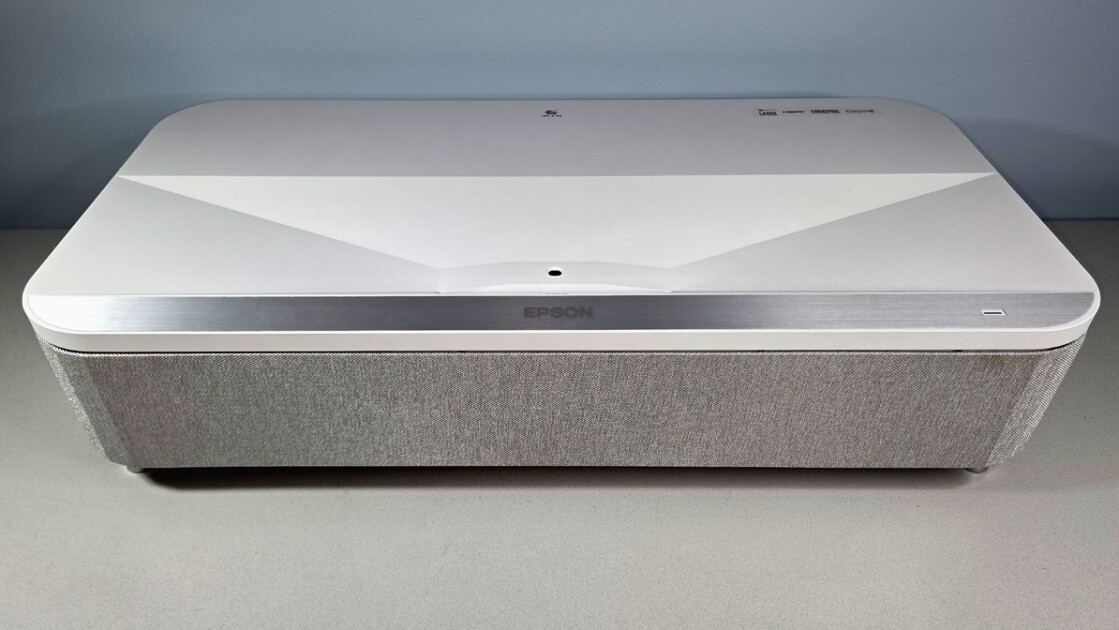
    The QS100, available in white or black, is just enough brighter than the LS800 to make a visible difference at any given image size. Epson rates its laser-phosphor light source at 4,500 ISO lumens and as having a 20,000-hour life at full power. The two models share essentially the same display technology, using three 1080p LCD chips (one for each primary color), and doubling the number of pixels on screen through pixel shifting.

    As I’ve discussed in other reviews, this approach delivers only half as many pixels as are in a 4K (3,840-by-2,160-pixel) image. But it makes little to no difference in perceived detail compared with the pixel shifting most DLP projectors use to deliver a full 3,840 by 2,160 pixels. Part of the reason Epson’s approach works so well has to do with the limits of human visual acuity. At normal viewing distances, those limits hide any difference that might actually exist. Beyond that, the ability to resolve detail is also affected by contrast, lens quality, and digital image processing, among other variables, and Epson’s PRO-UHD technology takes advantage of those factors as well.

    (Credit: M. David Stone)

    Another important plus for the three-chip design is that it guarantees the image can’t show rainbow artifacts (red/green/blue flashes that single-chip projectors can show). For those who don’t see these flashes, this won’t matter. But for those who see them easily and find them annoying, being rainbow-free can be a must-have feature, particularly if you’re laying out this much money for a projector.

    Similar Products

    Our Current Picks for
    The Best Short Throw and Ultra Short Throw Projectors for 2025

    Getting the projector up and running is straightforward, but positioning and image calibration can be a bit tricky. The QS100 weighs in at 26.5 pounds and measures 6.2 by 27.4 by 13.4 inches (HWD). Basic setup consists of little more than positioning it, connecting cables, turning it on, and focusing. As always, however, if you want the best possible image quality, you’ll need to position it carefully to fill the screen. Epson offers a robust set of adjustment features if you have to use them—including digital zoom, four-corner adjustments, individual point adjustment with your choice of three to 33 adjustment points on each vertical and horizontal line in a grid, and the Epson Setting Assistant phone app. However, all digital adjustments can introduce artifacts in some images, making them best avoided if you possibly can.

    Top, side facing screen, and side with panel covering controls and ports in place (right side from viewer's POV)

    (Credit: M. David Stone)

    The QS100 also requires manual focusing, which means you can’t stand back far enough to see the entire image at once, as you can with a powered focus controlled through the remote. It doesn’t quite turn focusing into a two-person job, but it helps to have a second person farther from the screen, who can tell you when the focus is right.

    As already mentioned, the QS100’s menus add all the right settings to let you fully calibrate (or, more likely, pay someone to calibrate) the projector for your room and screen. It will also let you store up to 10 different sets of settings in memory, so you can have separate calibrations for different lighting conditions, different sources, or both. What it leaves out, compared with the LS800, is built-in audio and streaming features, a design decision based on the assumption that, as with classic home theater installations, you’ll want to add a custom external audio system as well as image sources. For connecting to those sources, it offers two HDMI ports, one of which supports eARC and ARC, and a USB-A port for reading files from USB memory. A removable cover (shown below) hides the ports and physical controls.

    Top, side facing screen, and side (right side from viewer's POV) with panel that covers controls and ports opened but still attached by its tether

    (Credit: M. David Stone)

    The projector also has a LAN port strictly for remote external control. It’s noteworthy primarily because the QS100 supports Crestron and other common control systems that integrators often take advantage of. You also get an embedded web server (EWS) that you can log on to using a browser. However, it’s less useful than it could be: You can easily switch sources or turn off the projector, but it doesn’t help much for changing menu settings. Basically, you get the image of a touchpad on your PC’s screen, and must move your mouse over that image while holding the mouse button down to move the highlight in the QS100’s on-screen menu.


    Newsletter Icon

    Newsletter Icon

    Get Our Best Stories!

    All the Latest Tech, Tested by Our Experts


    Lab Report Newsletter Image

    Sign up for the Lab Report to receive PCMag’s latest product reviews, buying advice, and insights.

    Sign up for the Lab Report to receive PCMag’s latest product reviews, buying advice, and insights.

    By clicking Sign Me Up, you confirm you are 16+ and agree to our Terms of Use and Privacy Policy.

    Thanks for signing up!

    Your subscription has been confirmed. Keep an eye on your inbox!

    You can also select a highlighted item with a mouse click, but I found this even less convenient than the remote. Note, too, that you have to go to the QS100 user manual on Epson’s website to find the user names you need for logging on.

    Read the full article on the original site


    AI and Machine Learning Black Technologists Cybersecurity News Digital Innovation Emerging Technologies Future of Work Gadget Reviews Innovation in Education Minorities in Tech Silicon Valley Updates Smart Devices Software Development Startup News STEM News Tech Culture Tech Equity Tech for Good Tech Industry Updates Tech Trends Technology News
    Share. Facebook Twitter Pinterest LinkedIn WhatsApp Reddit Tumblr Email
    Savannah Herald
    • Website

    Related Posts

    Tech June 16, 2026

    Intel CPUs with Nvidia RTX integrated graphics are targeting an early 2028 release

    Tech June 15, 2026

    This Ultra-Thin Inspection Borescope With iPhone & Android Support Is 50% Off For Limited Time

    Tech June 15, 2026

    Cameras, sensors, and 3D body scans: All the tech helping eliminate blown calls

    Tech June 14, 2026

    MacBook Neo review: This laptop is even better 3 months later

    Tech June 13, 2026

    Latest Best Buy Canada sales discount phones, air conditioners, and more

    June 13, 2026

    Heat-surviving cyanobacteria switch to respiration when photosynthesis falters, 48-hour test reveals

    Comments are closed.

    Don't Miss
    Real Estate August 28, 2025By Savannah Herald02 Mins Read

    Spacious Home in Peachtree Corners with a Finished Basement

    August 28, 2025

    Real Estate News & Market Insights: Welcome to 3725 Highcroft Circle, a rare move-in-ready opportunity…

    Crystal Kay ~ From Japans R&B Princess to Global Resonance

    October 21, 2025

    The Supreme Court Just Ruled on Your Health, Rights & Representation

    November 1, 2025

    How To Approach Your Skincare Routine If You Have Eczema

    December 1, 2025

    NBA champs draft pick comes from HBCU hoops family

    November 25, 2025
    Archives
    • June 2026
    • May 2026
    • April 2026
    • March 2026
    • February 2026
    • January 2026
    • December 2025
    • November 2025
    • October 2025
    • September 2025
    • August 2025
    • July 2025
    • June 2025
    • May 2025
    • April 2025
    • March 2025
    • February 2025
    Categories
    • Art & Literature
    • Beauty
    • Black History
    • Business
    • Climate
    • Culture
    • Education
    • Employment
    • Entertainment
    • Faith
    • Fashion
    • Food
    • Gaming
    • Georgia Politics
    • HBCUs
    • Health
    • Health Inspections
    • Investing
    • Lifestyle
    • Local
    • Lowcountry News
    • National
    • National Opinion
    • News
    • Politics
    • Real Estate
    • Senior Living
    • Sports
    • State
    • Tech
    • Traffic
    • Transportation
    • Travel
    • World
    Savannah Herald Newsletter

    Subscribe to Updates

    A round up interesting pic’s, post and articles in the C-Port and around the world.

    About Us
    About Us

    The Savannah Herald is your trusted source for the pulse of Coastal Georgia and the Low County of South Carolina. We're committed to delivering timely news that resonates with the African American community.

    From local politics to business developments, we're here to keep you informed and engaged. Our mission is to amplify the voices and stories that matter, shining a light on our collective experiences and achievements.
    We cover:
    🏛️ Politics
    💼 Business
    🎭 Entertainment
    🏀 Sports
    🩺 Health
    💻 Technology
    Savannah Herald: Savannah's Black Voice 💪🏾

    Our Picks

    PSA examinations to evaluate for prostate cancer cells. What age makes good sense to obtain one?: Shots

    November 3, 2025

    Lady Tigers Fall To FVSU At SIAC Championship Semifinals

    November 25, 2025

    Atlanta’s Catholic community turns to faith after Minneapolis mass shooting

    November 11, 2025

    Last Essays 1952-1966 by André Breton – Compulsive Reader

    September 18, 2025

    Georgia Tech research shows Port of Savannah saves $1K per container for shippers

    April 15, 2026
    Categories
    • Art & Literature
    • Beauty
    • Black History
    • Business
    • Climate
    • Culture
    • Education
    • Employment
    • Entertainment
    • Faith
    • Fashion
    • Food
    • Gaming
    • Georgia Politics
    • HBCUs
    • Health
    • Health Inspections
    • Investing
    • Lifestyle
    • Local
    • Lowcountry News
    • National
    • National Opinion
    • News
    • Politics
    • Real Estate
    • Senior Living
    • Sports
    • State
    • Tech
    • Traffic
    • Transportation
    • Travel
    • World
    Copyright © 2002-2026 Savannahherald.com All Rights Reserved. A Veteran-Owned Business

    Type above and press Enter to search. Press Esc to cancel.

    Manage Consent
    To provide the best experiences, we use technologies like cookies to store and/or access device information. Consenting to these technologies will allow us to process data such as browsing behavior or unique IDs on this site. Not consenting or withdrawing consent, may adversely affect certain features and functions.
    Functional Always active
    The technical storage or access is strictly necessary for the legitimate purpose of enabling the use of a specific service explicitly requested by the subscriber or user, or for the sole purpose of carrying out the transmission of a communication over an electronic communications network.
    Preferences
    The technical storage or access is necessary for the legitimate purpose of storing preferences that are not requested by the subscriber or user.
    Statistics
    The technical storage or access that is used exclusively for statistical purposes. The technical storage or access that is used exclusively for anonymous statistical purposes. Without a subpoena, voluntary compliance on the part of your Internet Service Provider, or additional records from a third party, information stored or retrieved for this purpose alone cannot usually be used to identify you.
    Marketing
    The technical storage or access is required to create user profiles to send advertising, or to track the user on a website or across several websites for similar marketing purposes.
    • Manage options
    • Manage services
    • Manage {vendor_count} vendors
    • Read more about these purposes
    View preferences
    • {title}
    • {title}
    • {title}
    Ad Blocker Enabled!
    Ad Blocker Enabled!
    Our website is made possible by displaying online advertisements to our visitors. Please support us by disabling your Ad Blocker.

    Sign In or Register

    Welcome Back!

    Login below or Register Now.

    Lost password?

    Register Now!

    Already registered? Login.

    A password will be e-mailed to you.