




Aging Well: News & Insights for Seniors and Caregivers
- Medication reminders: Program Alexa to give recurring voice alerts so seniors take medications reliably and on schedule.
- Entertainment & cognitive stimulation: Play music, audiobooks, games, and trivia to reduce isolation and stimulate memory.
- Safety & smart home controls: Use voice commands to control lights, locks, thermostats, and monitor connected security devices.
- Emergency & caregiver support: Enable emergency contacts, fall-detection integrations, and Alexa Care Hub for family monitoring.
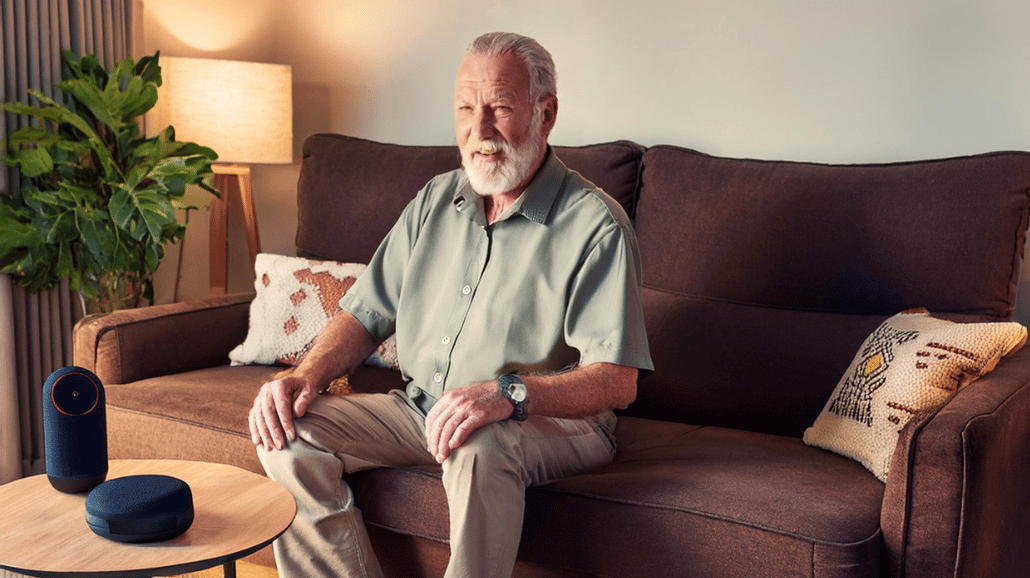
Voice-activated technology has revolutionized how people interact with their homes. Amazon’s Alexa-enabled devices, like the Echo Dot and Echo Show, can be especially beneficial for seniors suffering from dementia. Unlike other smart assistants, Alexa offers a screen-free, voice-activated experience, making it easier for those with memory challenges to access information, entertainment, and essential reminders with simple voice commands.
Here are 7 ways Alexa can support and engage seniors with dementia.
Is Alexa Good for Someone with Dementia?
Many families wonder whether voice-activated technology is appropriate for a loved one living with Alzheimer’s disease or early-stage dementia. For many seniors, Alexa can serve as a simple, low-barrier tool that reduces confusion and supports daily routines.
Because Alexa responds to voice commands, it eliminates the need to navigate complicated screens or remember passwords. For individuals in the early to mid-stages of dementia, this simplicity can provide reassurance, structure, and gentle reminders throughout the day.
However, as dementia progresses, voice commands may become more difficult. Caregivers should regularly assess whether the technology continues to meet their loved one’s needs.
1. Medication Reminders
Forgetting to take medications is common among seniors with dementia. Families can program Alexa’s reminder feature to alert your loved one at specific times, ensuring they take their medications as prescribed. A simple voice command such as, “Alexa, remind me to take my medication at 8 AM and 6 PM” can create a reliable routine.
Additionally, caregivers can set up recurring medication reminders via the Alexa app, ensuring consistency. Alexa can also remind seniors when it’s time to refill prescriptions or take necessary supplements. These reminders can give seniors and families peace of mind.
2. Daily News, Weather & Traffic Updates
Seniors who struggle to read the newspaper or follow the news on TV can get instant updates from Alexa. They can get weather and traffic alerts to stay in the know. With a simple request, they can ask:
- “Alexa, what’s the weather today?”
- “Alexa, give me today’s news update.”
- “Alexa, what’s the traffic like near me?”
Alexa can also be programmed to provide daily briefings with customized updates on topics that interest your loved one. By using Alexa for seniors, they can stay informed without needing to search for information.
3. Entertainment & Cognitive Stimulation
Seniors who are home alone may feel isolated or depressed because of a lack of social interaction. Smart home technology for seniors can help. Alexa offers various ways to keep seniors engaged and entertained:
- Music & Audiobooks: Seniors can listen to their favorite songs, playlists, or audiobooks simply by saying, “Alexa, play classical music” or “Alexa, read my audiobook.”
- Trivia, Jokes & Riddles: Alexa can tell jokes, ask trivia questions, and even engage in interactive storytelling, which can be a great way to stimulate cognitive function and provide companionship.
- Games & Brain Exercises: Seniors can play memory-boosting games like “Alexa, play 20 Questions” or “Alexa, start a memory challenge.”
- Virtual Travel Experiences: Alexa can describe famous landmarks, play travel-themed quizzes, or guide seniors through virtual museum tours, helping them explore the world from home.
RELATED CONTENT: Understanding the Stages of Dementia
4. Answering Common Questions
Seniors with memory loss and cognitive decline may repeatedly ask the same questions. Instead of feeling frustrated, they can rely on Alexa to provide answers. They can ask:
- “Alexa, what day is it?”
- “Alexa, who is the president?”
- “Alexa, what time is it?”
- “Alexa, what’s on my calendar today?”
This feature helps reduce confusion and anxiety, giving seniors instant reassurance and keeping them oriented to the time and date.
5. Calendar & Schedule Reminders
A reliable calendar can help seniors stay on track with appointments, meal times, or social events. These reminders can help seniors with day-to-day activities, helping them to live independently as long as possible. Alexa can:
- Provide daily reminders for important tasks like doctor visits or birthdays.
- Sync with a family member’s calendar to help caregivers manage their loved one’s schedule.
- Announce reminders with voice alerts rather than relying on written notes.
- Set recurring alarms for wake-up times, meal schedules, or exercise routines to establish consistency in daily habits.
6. Grocery & To-Do Lists
Seniors with dementia often forget what they need to buy or do around the house. Alexa’s list-keeping feature allows them to create and access shopping or task lists hands-free. They can say:
- “Alexa, add milk and eggs to my shopping list.”
- “Alexa, what’s on my to-do list today?”
The lists are accessible through the Alexa app, making it easy for caregivers to review and assist as needed. Additionally, family members can add items to shared lists, ensuring that necessary groceries and household items are never forgotten.
7. Smart Home Controls for Safety & Comfort
For seniors using smart home technology, Alexa can enhance their independence by controlling smart appliances and home settings. With simple voice commands, they can:
- Turn lights on and off: “Alexa, turn on the bedroom light.”
- Adjust the thermostat: “Alexa, set the temperature to 72 degrees.”
- Lock doors and monitor security cameras: If integrated with smart locks and cameras, Alexa can provide an added layer of safety.
- Control the TV and other entertainment devices: Seniors can request their favorite shows or adjust the volume without needing to fumble with remotes.
8. Emergency Assistance & Caregiver Support
Alexa can be a valuable tool in emergencies. Seniors can enable features like:
- Alexa Emergency Contact: Allows seniors to call a designated contact for help by saying, “Alexa, call for help.”
- Fall Detection Integration: Some Alexa-compatible devices can be connected to fall detection systems, alerting caregivers in case of an accident.
- Alexa Care Hub: Family members can use this feature to check on their loved one’s activity and receive alerts if there is no movement or interaction detected for an extended period.
While Alexa can support safety, it should not replace professional medical alert systems. Alexa relies on WiFi and power access, which means it may not function during outages unless backup systems are in place.
Additionally, Alexa cannot automatically detect every fall unless paired with compatible devices. Families should consider combining smart home technology with wearable alert systems for comprehensive protection.
Making Alexa More Accessible for Seniors
Of course, Amazon Echo was not specifically designed for Alzheimer’s disease or related dementias. And at a certain point in dementia’s progression, voice
commands may become too difficult. To maximize Alexa’s usefulness for seniors with earlier stages of dementia, caregivers can:
- Adjust Alexa’s settings for slower speech and larger font size on screen-based devices.
- Use “Drop-In” features to check in on seniors remotely.
- Set up Alexa Routines to automate daily reminders, greetings, or activity prompts.
- Create easy-to-follow voice command lists for seniors to use independently.
Limitations of Alexa for Dementia Care
Although Alexa offers many benefits for dementia care at home, it is not a standalone solution.
- Individuals in later stages of Alzheimer’s may struggle with voice recognition.
- Some seniors may become confused by unexpected announcements.
- Privacy concerns should be discussed with family members.
- Technology should supplement — not replace — human interaction.
Smart devices work best when combined with compassionate caregiving and structured routines.
FAQs About Alexa for Seniors with Dementia
- Can Alexa detect falls? Alexa alone does not automatically detect falls. However, some Alexa-compatible devices integrate with fall detection systems that alert caregivers.
- Can Alexa call 911? Alexa can call designated contacts if enabled, but emergency features vary by location and setup. Families should verify settings and consider a dedicated medical alert device.
- Is Alexa safe for someone with Alzheimer’s? For individuals in early or moderate stages, Alexa can provide helpful reminders and engagement. Caregiver oversight is still important.
- How do you set up Alexa for an elderly parent? Caregivers can configure reminders, emergency contacts, and routines through the Alexa app. Setting up simplified voice command instructions can improve ease of use.
- What is Alexa Care Hub? Alexa Care Hub allows family members to monitor activity patterns and receive alerts if unusual inactivity occurs.
Final Thoughts: A Helpful Companion for Seniors with Dementia
Alexa is more than just a smart speaker—it’s a valuable tool for enhancing safety, engagement, and daily routine management for seniors with dementia. Whether it’s providing reminders, offering companionship, or making daily tasks easier, assistive devices like Alexa can help improve quality of life for both seniors and their caregivers.
At Caring Senior Service, we understand the importance of technology in improving senior care. Our experienced caregivers can assist with setting up Alexa and integrating it into a loved one’s daily routine. Contact a location near you to learn more about our home care services!
Read the full article on the original source
